Channel Studio TDL
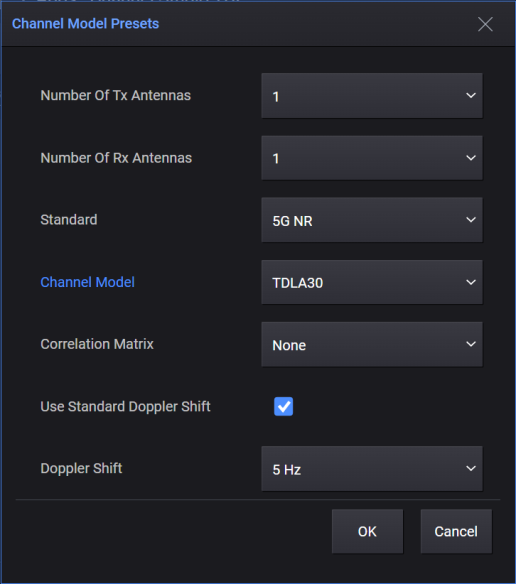
You can set the preset preferences for the fading profile by clicking the Channel Model Presets option.
On clicking OK in the Channel Model Presets dialog, a new fading profile configuration is created with parameters preset to the values defined in the related 3GPP test specs. You can then customize these parameters, if needed.
|
SCPI Command |
[:SOURce]:RADio:CSTDl:FADing:CHANnel:MODel:PRESet "MIMOOrderTx:<integer>,MIMOOrderRx:<integer>,Standard:NR5G|LTE|NRNTN,ChannelModel:STATic|EPA|ETU|EVA|TDLA10|TDLA30|TDLA100|TDLB100|TDLC300|TDLD10|TDLD30|TDLC5|TDLC60,CorrelationMatrix:NONE|LOW|MEDium|MEDA|XPMED|HIGH|XPHIGH,DopplerShift:<integer>" |
|
SCPI Example |
:RADio:CSTDl:FADing:CHANnel:MODel:PRESet "MIMOOrderTx:1,MIMOOrderRx:1,Standard:NR5G,ChannelModel:STATic,CorrelationMatrix:NONE,DopplerShift:0" |
|
Couplings |
|
|
Preset |
|
|
State Saved |
No |
|
Initial S/W Revision |
A.19.00 |
| Modified S/W Version |
A.19.03
|
No SCPI, GUI only
By default, this checkbox is selected.
When this checkbox is selected, you can only select the Dopper Shift values that are predefined in standard. These values are displayed as options in the Doppler Shift listbox.
When this checkbox is unchecked, you can input arbitrary value for Dopper Shift in the Doppler Shift textbox.
|
SCPI Command |
N/A |
|
Preset |
ON |
|
State Saved |
No |
|
Initial S/W Revision |
A.19.03 |